Updated: November 2026
If your phone supports eSIM and isn't carrier-locked, a Japan eSIM is the easiest choice: you install it before you fly and skip the airport counter. If you need a physical card, Sakura Mobile's unlimited SIM on Klook is the safer default, because its speed after the daily high-speed allowance (1Mbps) is still usable. The cheaper Japan SIM drops to 200kbps after 10GB in three days. All three options here are data-only: none gives you a Japanese phone number.
Best for most travellers: a Japan eSIM if your phone supports it. If not, the Sakura Mobile unlimited SIM on Klook. It runs on NTT Docomo, lasts 5–31 days, allows hotspot sharing, gives about 3GB a day at high speed and then 1Mbps, and can be picked up at Narita, Haneda, Kansai or Fukuoka. It currently lists from about US$22.
What matters before you buy
- "Unlimited" means three different things. Sakura's Klook SIM slows to 1Mbps after about 3GB a day. The cheaper Japan SIM slows to 200kbps after 10GB in three days. Klook's unlimited eSIM gives 10GB a day at full speed, then 128kbps. At 1Mbps, maps and messaging still work; at 128–200kbps, pages and maps load slowly. Compare the speed after the limit, not the word "unlimited".
- Your phone decides SIM or eSIM. The eSIM needs an eSIM-capable, unlocked phone; Klook says locked iPhones aren't supported. A physical SIM also needs an unlocked phone, and Sakura’s standard Klook package gives no refunds for compatibility problems; its “Unlimited Data with Compatibility Insurance” package ships a replacement WiFi device to your hotel if the SIM doesn’t work. Check your phone's lock status with your carrier before paying for either.
- Your arrival airport narrows the choice. The Klook Japan SIM has no Narita pickup. The Klook Sakura SIM has no Nagoya (Chubu) or Hokkaido (New Chitose) pickup. Pick the SIM that's waiting at your airport, or take an eSIM and skip pickup.
- The clock starts at different moments. Both physical SIMs start their validity the moment you insert them. The eSIM's validity starts only when it first connects to a network abroad, so you can install it at home. Don't insert a physical SIM to "test" it before your trip.
- None of these gives you a phone number. All three are data-only. If you need a Japanese number for calls or SMS codes, buy a voice-enabled plan instead.
Quick answer: best Japan SIM card for tourists
| Option | Best for | Price (Klook, Nov 2026) | High speed, then | Pickup | Main catch |
|---|---|---|---|---|---|
| Japan eSIM (Klook) | eSIM-capable, unlocked phones | varies by plan | Unlimited plans: 10GB/day, then 128kbps | None needed | Doesn't work on locked iPhones |
| Sakura Mobile unlimited SIM | Most physical-SIM users | from about US$22 | about 3GB/day, then 1Mbps | Narita T1/T2, Haneda T2/T3, Kansai, Fukuoka | No Nagoya or Hokkaido pickup |
| 5G Japan SIM (Vision) | Budget, light data use | from about US$16 | 10GB in 3 days, then 200kbps | Haneda, Kansai, Chubu, New Chitose, Fukuoka | No Narita pickup; very slow after the limit |
Prices are the Klook “from” prices shown on 15 November 2026 for the shortest plan; longer plans cost more, and prices change. All three are data-only and support hotspot sharing.
SIM, eSIM or pocket WiFi?
Take an eSIM if your phone supports it. Take a physical SIM if it doesn't. Take a pocket WiFi if several people will share one connection all day.
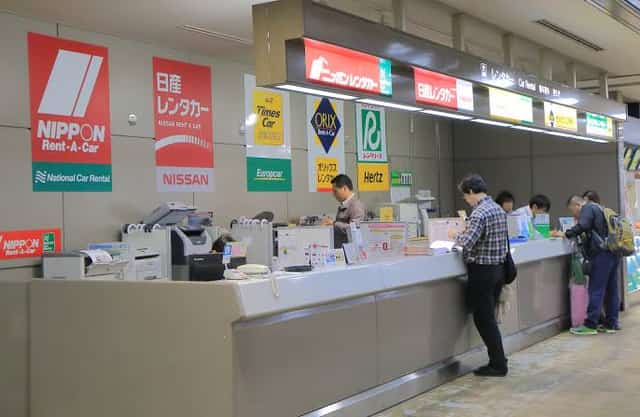
The eSIM wins on logistics: no counter, no queue after a late landing, and your home SIM stays in the phone. A physical SIM makes sense for older or eSIM-less phones, or if you'd rather have counter staff help with setup. Sakura's Klook listing notes that its Haneda and Narita counters are run by third parties and can't give SIM support.
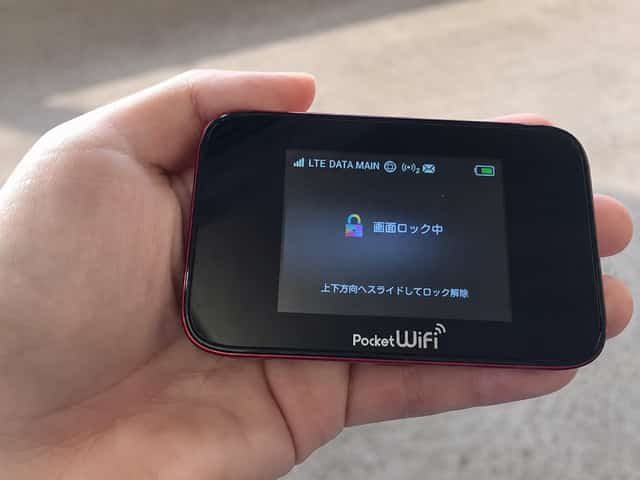
A pocket WiFi suits families: one device, several phones and laptops. Every SIM here allows hotspot sharing, but tethering a laptop burns through a 3GB daily allowance quickly. Our Japan pocket WiFi comparison compares five rentals by data, price and battery.
The three options in detail
Japan eSIM (Klook): best if your phone supports eSIM
Best for: unlocked, eSIM-capable phones. Daily plans run on SoftBank 5G and total-data plans on IIJ (Docomo) 4G, for 1 to 30 days. Install it before you fly, keep data roaming off, and turn it on after landing. The catch: unlimited plans drop to 128kbps after 10GB a day, and Klook says most mainland China and Hong Kong devices are incompatible. Key number: no pickup at all.
Sakura Mobile unlimited SIM: best physical SIM for most travellers
Best for: physical-SIM users who use maps, social media and some video. It runs on NTT Docomo, 5G/4G, for 5 to 31 days, with hotspot sharing. The catch: it’s data-only, you can’t top it up, and the standard package gives no refunds if your phone turns out to be incompatible. Key number: 1Mbps after the daily 3GB, five times the budget SIM's 200kbps.
5G Japan SIM (Vision): best budget SIM for light users
Best for: maps, messaging and email on a tight budget, landing at Haneda, Kansai, Nagoya, Hokkaido or Fukuoka. It runs on NTT Docomo's network (MVNO) for 5 to 31 days, with hotspot sharing. Support comes from Vision, the company behind NINJA WiFi. The catch: after 10GB in three days it slows to 200kbps, and there's no Narita pickup. Key number: about US$6 cheaper than Sakura for the shortest plan.
Japan SIM card with unlimited data: what you really get
For ordinary sightseeing, the Sakura SIM's 3GB a day is enough, and the 1Mbps fallback means you're never stranded.
| Option | Full speed | After the limit | Comfortable after the limit |
|---|---|---|---|
| Sakura Mobile (Klook) | about 3GB/day | 1Mbps | Maps, messaging, browsing |
| 5G Japan SIM (Vision) | 10GB per 3 days | 200kbps | Messaging and email |
| Japan eSIM, unlimited plan (Klook) | 10GB/day | 128kbps | Text messaging |
Heavy users should compare daily allowances: the eSIM's 10GB a day is the most generous. Light users should compare price, where the budget SIM wins if you won't hit 10GB in three days. Sakura's listing also says speeds may be limited for heavy use under its fair usage policy, without notice.
Which airport, which SIM?
Match the SIM to where you land. Pickup points on the current Klook listings:
| Airport | Sakura Mobile (Klook) | 5G Japan SIM (Klook) |
|---|---|---|
| Narita T1/T2 | Yes | No |
| Haneda | T2 and T3 | Yes (NINJA WiFi counter) |
| Kansai | Yes | T1 |
| Fukuoka | International terminal | Yes |
| Chubu (Nagoya) | No | Yes |
| New Chitose (Sapporo) | No | International terminal |
Landing at Narita on a budget? The 5G Japan SIM isn't an option, so choose Sakura or an eSIM. Landing at Nagoya or Sapporo? Choose the 5G Japan SIM or an eSIM. Counter hours vary by airport and terminal; check them on your voucher before booking a late-night arrival.
Sakura Mobile also sells its SIM directly, with pickup at more airports, including Chubu (weekdays only) and New Chitose. It asks for orders at least three days before pickup; its plans run from 4 to 93 days and start from ¥3,850 (about US$24), tax included.
Other option: NINJA WiFi's own SHOGUN SIM offers daily, fixed-data and unlimited plans on Docomo and SoftBank. We couldn't load its plan page on 12 November 2026, so we don't quote its prices here.
Flying into New Chitose for a winter trip? Our Biei and Furano day tour guide compares the tours from Sapporo, from the Asahiyama Zoo penguins to the Blue Pond light-up.
Common Japan SIM mistakes
- Buying on the word "unlimited". Check the speed after the limit: 1Mbps and 128kbps are very different trips.
- Not checking the phone lock. Neither a physical SIM nor an eSIM fixes a carrier-locked phone, and compatibility problems aren’t refunded on Sakura’s standard Klook package.
- Booking a SIM that isn't at your airport. The budget SIM has no Narita counter.
- Inserting the SIM early. Physical SIM validity starts on insertion.
- Expecting a phone number. These are data-only. For local transit payments, see our Suica guide; an IC card doesn't need a Japanese number.
Final verdict
- For most travellers with an eSIM-capable, unlocked phone, take the Japan eSIM and skip the counter.
- For a physical SIM, choose Sakura Mobile for its 1Mbps fallback and Narita pickup.
- For the lowest price and light data use, choose the 5G Japan SIM, unless you land at Narita.
- For a family sharing one connection, compare pocket WiFi first.
FAQ
Can I top up a Japan tourist SIM?
Not the Sakura Mobile SIM sold on Klook: its listing says calls, texts and topping up extra credit aren't possible. Buy a longer plan if you're unsure how many days you need.
Does the eSIM start counting days as soon as I install it?
No. On Klook's Japan eSIM, validity starts when it first connects to a network abroad, so you can install it at home and turn on data roaming after landing.
Can I share data with a laptop or a travel partner?
Yes, all three allow hotspot sharing. A laptop can use a daily high-speed allowance in a few hours, so for several devices a pocket WiFi or a separate eSIM per person is safer.
Will a Japan SIM work in my phone from Hong Kong or mainland China?
Check first. Klook says most mainland China and Hong Kong devices can't use its Japan eSIM, and every option here needs an unlocked phone that supports Japanese networks.
How we checked
We compared the three Klook listings most often bought for Japan data: Sakura Mobile's unlimited SIM, the 5G Japan SIM with airport pickup, and the Japan eSIM. For each, we read the current price, data allowance and speed after the limit, network, validity, hotspot, activation rule, pickup points and device requirements on 12 November 2026. Prices are the listings' "from" prices and change with plan length and date. Bookings and ratings weren't used to rank. Links to Klook may earn us a commission.
Sources (checked 15 November 2026): Klook listings for the Sakura Mobile unlimited SIM, the 5G Japan SIM (Japan airport pickup) and the Japan eSIM; Sakura Mobile’s direct prepaid tourist SIM page. NINJA WiFi’s SHOGUN SIM plan page couldn’t be loaded on 12 November 2026.
Written by

Former KLOOK Recommender System Expert
Built the systems that decided which products ranked first for users in KLOOK. That experience taught me that rankings just optimize clicks and conversions for OTA — not necessarily what truly fits each traveler. Today, I write evidence-based verdicts using my 4 year experience on product: whether they're worth it, who they suit, and when you're better off skipping them.